Mobile · RevenueCat · October 2026 · 11 min read
RevenueCat affiliate tracking, without paying Branch $1,000/mo
The setup that finally works for indie iOS and Android subscription apps. RevenueCat-native, Universal Links, zero IDFA, flat-fee instead of MMP tiered pricing.
If you run an indie iOS or Android subscription app, you've probably had this conversation. A creator wants to promote your app. They want a unique link that credits them when their audience installs and subscribes. You go looking for "mobile affiliate attribution" and find two answers, both bad.
The first answer: pay Branch.io or AppsFlyer somewhere between $1,000 and $4,000 a month. These are mobile measurement platforms (MMPs) built for VC-funded apps spending six figures on paid acquisition. They do solve attribution, but they also do SKAdNetwork postbacks, ad-network integrations, fraud scoring, deep-link cohort dashboards, and a hundred other things you don't need. You pay for all of it.
The second answer: build it yourself. Read Apple's Associated Domains documentation, set up Universal Links and App Links, host an apple-app-site-association file, wire RevenueCat's webhook, write a Postgres schema for affiliates and conversions, build a portal so creators can see their stats, build a payout pipeline. Then maintain it for the next two years while you're trying to ship product features.
There's a third answer now, and the rest of this post is about what it actually takes to build mobile affiliate attribution correctly so you understand exactly what AffRef does on your behalf.
What affiliate attribution for mobile apps actually requires
Four discrete pieces have to work together:
- A short link the creator can share that survives copy-pasting into a podcast description, an Instagram bio, or a tweet. Has to identify both your app and which creator referred the user.
- A deep-link mechanism that opens your installed app directly when the user taps the link with the app already on their phone. Carries the affiliate code into the app.
- An install-time attribution path for the much more common case where the user doesn't have the app installed yet. Has to get the affiliate code through the App Store / Play Store detour so the freshly-installed app knows who referred this user.
- A conversion event that fires when the user actually subscribes, tied back to the captured affiliate code, with refund-aware reversal when Apple or Google issues a refund.
Each piece has a clean answer. Most DIY attempts fail because one piece is shaky, and shaky attribution costs you trust with the affiliates whose payouts are wrong.
The short link
This is the easy part. Creator shares https://yourdomain.com/r/CREATORCODE or https://affref.com/go/your-app/CREATORCODE. Both work. AffRef hosts the short link on the affref.com apex so you don't have to wire up a redirect service yourself, but you can use your own domain if you want to white-label.
The deep link, when the app is installed
Apple's blessed mechanism is Universal Links. Google's equivalent is App Links. They work the same way: your app declares one or more web domains as "associated", iOS and Android verify the association via a JSON file hosted on that domain, and from then on, any tap on a URL from that domain opens your app directly instead of the browser. The full URL gets passed into your app via NSUserActivity (iOS) or Intent.ACTION_VIEW (Android).
The two files that make this work:
- Apple AASA file at
https://yourdomain.com/.well-known/apple-app-site-association. Maps your app's Team ID and Bundle ID to the URL paths that should open your app. - Android assetlinks.json at
https://yourdomain.com/.well-known/assetlinks.json. Maps your app's package name and SHA256 signing fingerprint to the same domain.
If you're hosting these yourself, you have to update them every time you add a new build with a different fingerprint, get the JSON schema exactly right (Apple is unforgiving), and verify they're being served as application/json with the correct cache headers. AffRef serves both files for you, aggregated across every brand that's pasted in their Team ID, Bundle ID, package name, and fingerprint. You add the entitlement to your app, paste your identifiers into AffRef, and the AASA file updates server-side.
The harder part: attribution when the app is not installed
This is where most DIY attempts break, and where Branch and AppsFlyer earn their fee in their core market (paid ad attribution). The user taps a link, gets sent to the App Store, downloads, opens the app, and the app has no idea which creator referred them.
There are four real techniques for deferred deep-link attribution:
1. Clipboard handoff (don't use this)
An interstitial page on your domain writes the affiliate URL to the clipboard via JavaScript right before redirecting to the App Store. On first launch, your app reads the clipboard, extracts the code, and credits the install. Looks slick on paper. In practice, iOS 14 and later show a "AppName pasted from Safari" permission prompt every time the app reads the clipboard. Half your users tap "Don't Allow" out of habit, the other half tweet that your app is creepy. We tested this end-to-end on a real iPhone running iOS 26; the prompt fires every time. Apple's detectPatterns(.probableWebURL) API is privacy-preserving (no prompt), but it only tells you whether a URL exists in the clipboard, not what it is. Reading the actual content triggers the prompt.
2. Fingerprint matching (acceptable as a fallback)
When the user taps the affiliate link in mobile Safari or Chrome, you record their IP address, locale, country, and user-agent. On first app launch, the app calls your backend with the same signals. You match on IP within a tight window (say 24 hours) and credit the install. Accuracy is around 50 to 70 percent. Higher when users are on cellular (stable IP) than on Wi-Fi (NAT collapses). It's not great, but it's the only fully-passive mechanism that needs zero user permission. AffRef runs this as a backup attribution path, automatically, with no SDK code on your side.
3. SKAdNetwork (don't use this for affiliate)
Apple's official deferred-attribution mechanism. Conceptually clean, practically painful. Requires the source platform to register itself with Apple, the destination app to declare conversion-value mappings, and Apple to send postback URLs back after install. Designed for paid ad networks (Meta, TikTok, Google) bidding for installs in aggregate. For organic creator-shared affiliate links, SKAdNetwork is overkill and gives you aggregated lossy data with multi-hour delays. Skip it.
4. Repeat tap after install
This is the underrated one. If your app has Universal Links wired up correctly, the user's second tap on an affiliate link from that creator opens the app directly. So your real attribution rate is: (install attribution via fingerprint, ~60%) plus (repeat-tap attribution via Universal Links, ~99% of those who tap again). For a creator program where the same audience sees the link multiple times across podcast episodes or social posts, this stacks. The numbers add up to ~85-90% effective attribution within the first week of an install, with zero permission prompts. That's better than anything you'd get from pure SKAdNetwork.
The conversion event
Once you've captured the affiliate code in your app, you need to thread it through to the subscription event. The standard way: set a user attribute on whichever subscription SDK you use. RevenueCat, Adapty, Qonversion all support custom attributes. You call Purchases.shared.attribution.setAttributes(["affref_code": code]) (iOS RevenueCat) or its Android / Adapty / Qonversion equivalent.
When the user subscribes, your subscription provider fires a webhook to your backend with the user's subscription event AND their custom attributes. Your backend reads the affref_code attribute, looks up the affiliate, and creates a conversion record with the right commission split.
RevenueCat sends a handful of discrete event types you have to handle differently:
INITIAL_PURCHASE— first paid subscription. Credit the affiliate.TRIAL_STARTED— user started a free trial. Decide your policy: credit now (faster feedback for affiliate) or credit only on conversion (more accurate).TRIAL_CONVERTED— trial converted to paid. Credit if you didn't credit on TRIAL_STARTED.RENEWAL— recurring renewal. Most affiliate tools double-count if you credit this naively. Skip it unless you've designed your model for recurring per-renewal commissions.CANCELLATION— user canceled. Don't claw back the past commission unless cancel_reason is CUSTOMER_SUPPORT or DEVELOPER_INITIATED, which mean a refund was issued.BILLING_ISSUE— ignore. The customer didn't pay; the past commission stays (until the refund event fires, if it does).
Get this wrong and you'll either underpay creators (they'll quit your program) or overpay them on refunded transactions (you'll quit your program). AffRef handles all six event types correctly, with a per-app trial policy toggle and a sandbox-vs-production gate so TestFlight purchases don't pollute live conversion data.
Why Branch and AppsFlyer are overkill
Both are excellent products for what they're built for: full mobile measurement platforms with SKAdNetwork orchestration, ad-network postback configuration, deep-link cohort analytics, dynamic deferred-deep-link routing across hundreds of campaign sources. Their pricing reflects that: tiered by MAU, conversion volume, and feature add-ons, typically starting around $1,000 a month for serious usage and rising fast.
For an affiliate program specifically (you have creator partners, they share links, you want to know which creator drove each subscription, you pay them a commission), most of the MMP feature set is unused. You're paying for SKAdNetwork ad-network connectors you'll never configure. The Universal Links setup is the same architecture either way; you can implement it directly without renting a $12,000-a-year MMP middleman.
How AffRef stitches it together
The setup, end-to-end, takes about 15 minutes on the developer side and is mostly copy-paste:
- Sign up. Pick "Mobile" when adding your first brand. AffRef generates a publishable key (safe to commit to your app source).
- Paste your Apple Team ID + Bundle ID and Android package name + SHA256 release fingerprint into the Mobile SDK integration page.
- Add the Associated Domains capability in Xcode with
applinks:affref.com. Add the autoVerify intent-filter in your AndroidManifest.xml. - Drop the SDK in your app. Two lines to initialize, one line to forward Universal Link activities. The SDK extracts the code from the URL and fires an
onCodeCapturedcallback. - In your callback, set the captured code as a user attribute on RevenueCat (or Adapty, Qonversion, whatever you use).
- Paste AffRef's per-brand webhook URL into RevenueCat's webhook settings. Set a shared Authorization header value. Save in both places.
Every install, subscription, trial conversion, and refund now flows through automatically. The dashboard updates in real time. Affiliates see their stats in a branded portal. Payouts go out via Stripe Connect, Wise, or PayPal depending on your plan. AffRef never takes a cut of your commissions.
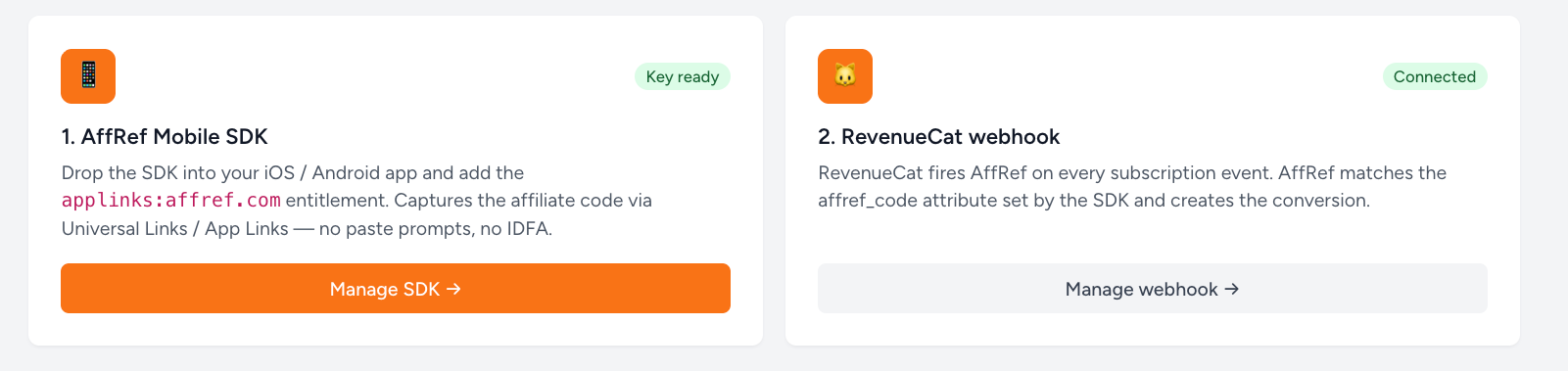
Visually, this is what the integration page on AffRef looks like once both pieces are connected:
Privacy story
No IDFA. No ATT prompt. No GAID on Android. No clipboard reads. No fingerprinting from the SDK side. The device ID the SDK uses is a UUID generated and stored locally per-app, not cross-app trackable. Universal Links and App Links are Apple's and Google's blessed mechanism for opening an installed app from a web URL; they require no user permission and don't expose any device identifier.
The fingerprint fallback that runs server-side uses IP, country, locale, and user-agent. None of that is personal data under current ATT or GDPR interpretation when used for legitimate-interest attribution. We don't store IPs longer than the 24-hour attribution window.
Caveats and gotchas to know about
- Free Apple Developer accounts can't add Associated Domains. Apple gates the capability behind the $99/year Apple Developer Program. If you're shipping a real app to the App Store, you already have this. If you're just testing on your personal device with a free Personal Team, you can't fully test Universal Links until you enroll.
- Android App Link verification uses release-keystore fingerprints, not debug. If you submit your debug-keystore SHA256, Android will silently fail verification and the link will open in the browser instead of your app. Get the right fingerprint from Play Console → Setup → App signing, or via
keytool -list -v -keystore release.keystore. - Sandbox events. TestFlight and StoreKit-sandbox purchases fire RevenueCat webhooks with
environment: "SANDBOX". AffRef drops these by default so your live conversion counts stay clean. Toggle the gate when you're actively wiring up integrations. - The SDK is in private beta. We're shipping the SDK package directly to the first cohort of merchants before opening public access. Sign up, message us in the chat, and we'll get you the package and walk through integration.
Get started
Start your 7-day free trial. Add your first Mobile brand, paste your Team ID and Bundle ID, and message us in the chat to get the SDK package. From there, you'll have your first affiliate-tracked install within an hour.
If you're still in the "evaluating tools" phase, the For Mobile page has the full feature grid. Questions? Email [email protected]. Async-only, no demos, no sales pipeline.